

Create an Account with M2 Register
Table of Contents
How to Complete the M2 Register Process
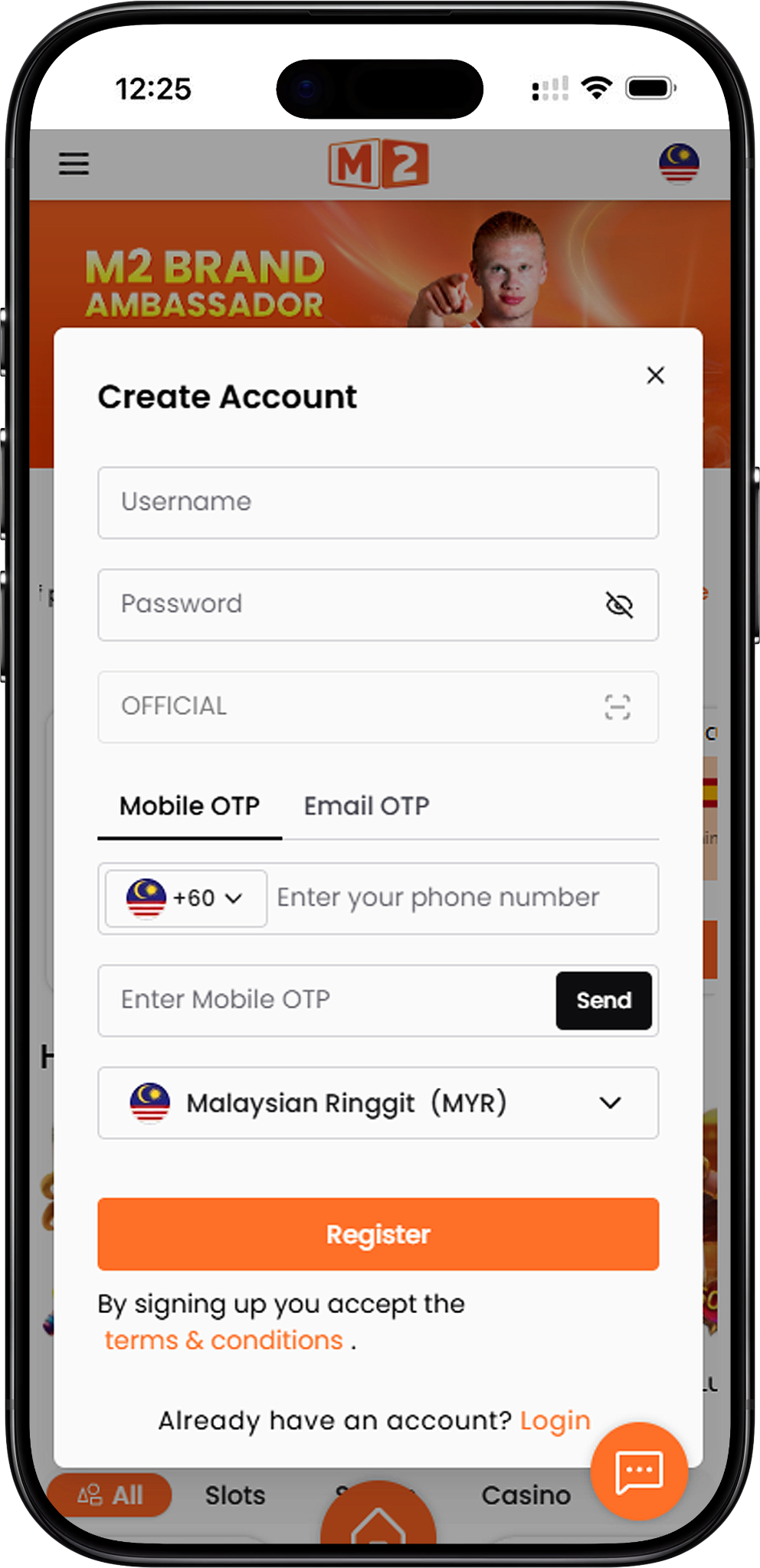
The registration form allows new members to create an account with a username, password, optional referral information, identity verification method, and preferred currency. Begin through the Register page (/en/register – Internal Link) and complete each field with accurate information.
Step 1: Open the Registration Form
Visit the official Home page (/en – Internal Link) and select Register, or enter m2mya.com directly in your browser before navigating to the registration section. Check the address carefully before submitting personal details.
Step 2: Create a Username
Enter a username that is easy for you to remember but difficult for another person to predict. Avoid using sensitive information such as your complete phone number, identification number, or password.
Step 3: Set a Secure Password
Create a unique password that is not used for your email, banking services, or other entertainment accounts. Use a combination of letters, numbers, and permitted symbols where supported.
Step 4: Enter a Referral Code
Add a referral code when one has been provided by an authorised agent or an existing member. Confirm that the code is correct before continuing because referral information may not be editable after account creation.
Step 5: Select an OTP Method
Choose Mobile OTP to verify a Malaysian phone number or Email OTP to verify an accessible email address. Request the code only after checking that the entered contact information is accurate.
Step 6: Select Your Currency
Choose Malaysian Ringgit (MYR) when it is the appropriate account currency. Review this selection carefully because currency settings can affect future deposit, withdrawal, and account transaction options.
Step 7: Accept the Terms and Register
Read the Terms and Conditions (/en/terms-and-conditions – Internal Link), confirm that you meet the applicable eligibility requirements, and select Register only after reviewing all entered information.
Choose Mobile OTP or Email OTP
Mobile OTP Verification
Select Mobile OTP, confirm the Malaysia country code +60, enter your active phone number, and press Send. Enter the verification code received on that number within the permitted time.
Email OTP Verification
Select Email OTP, provide an email address you can access, and press Send. Check the inbox and spam folder before requesting another code, as repeated requests may invalidate an earlier OTP.
Keep Verification Codes Private
An OTP is intended only for account verification. Do not share it with another person, publish it in a message group, or provide it to anyone claiming they need the code to create the account for you.
Use a Referral Code or QR Code Correctly
Confirm the Referral Source
A referral code should come from a source you recognise. Check each character carefully and avoid copying codes from unverified advertisements, unofficial messages, or altered registration pages.
Verify a QR Code Before Continuing
A QR code may offer quicker access to a registration page or referral link. After scanning, inspect the destination before entering information and confirm that it leads to the official registration environment.
Register Without Referral Information
When the Referral Code field is optional, members without a valid code may leave it blank. Do not enter random characters merely to complete the field.
Review Your Registration Information
Check Your Username and Contact Details
Confirm the spelling of your username, phone number, or email address. Incorrect contact information may prevent OTP delivery and make future account recovery more difficult.
Confirm Malaysian Ringgit as the Currency
Make sure Malaysian Ringgit (MYR) is displayed when that is your intended account currency. Contact member support before registration when the required currency is unavailable or unclear.
Read the Applicable Account Rules
Review the account requirements, permitted use, transaction conditions, and member responsibilities through the Terms and Conditions page (/en/terms-and-conditions – Internal Link) before submitting the form.
Protect Your New Account
Use a Unique Password
Do not reuse a password from another service. Store account credentials securely and avoid saving them on public computers, shared browsers, or devices that are not protected by a screen lock.
Access the Account Through Official Pages
After registration, use the Login page (/en/login – Internal Link) to sign in. Avoid opening account links from unexpected messages or advertisements that imitate official pages.
Sign Out on Shared Devices
Log out after each session when using a shared computer or mobile device. Clear stored credentials and browser data when the device is not under your control.
Access Member Services After Registration
Explore Available Entertainment Categories
Registered members can review available options through the Games page (/en/games – Internal Link), including Slots (/en/games/slots – Internal Link), Sports (/en/games/sports – Internal Link), Casino (/en/games/casino – Internal Link), and Lottery (/en/games/lottery – Internal Link).
Review Payment Guidance
Before making a transaction, read the instructions on the Deposit page (/en/deposit – Internal Link) and Withdrawal page (/en/withdrawal – Internal Link). Use payment details that belong to the registered account holder where required.
Check Promotions and Rebate Information
Review eligibility requirements before joining any offer through the Promotions page (/en/promotions – Internal Link) or checking the Rebate page (/en/rebate – Internal Link). Terms, qualifying activity, and availability may differ between offers.
Learn More About the Platform
Members can review platform information on the About Us page (/en/about-us – Internal Link), obtain access guidance from the Download page (/en/download – Internal Link), or learn about referral opportunities through the Agent page (/en/agent – Internal Link).
Frequently Asked Questions
What information is required to sign up?
New members generally need a username, password, valid phone number or email address, OTP verification, and a currency selection. A referral code may be optional depending on how the registration page is accessed.
Can I verify my account by email?
Yes. Select the Email OTP tab, enter an accessible email address, request the code, and submit the received Email OTP in the verification field.
Why did I not receive the Mobile OTP?
Check the +60 country code, phone number, mobile signal, and message filtering settings. Wait briefly before requesting another code because the previous OTP may expire when a new one is issued.
Is a referral code compulsory?
The displayed form allows referral information to be entered, but its requirement may depend on the registration channel. Leave the field blank when it is optional and you do not have a verified code.
Can I change the account currency later?
Currency changes may be restricted after registration. Confirm Malaysian Ringgit (MYR) before creating the account and contact member support when another currency is required.
What should I do after creating an account?
Proceed to the Login page (/en/login – Internal Link), enter the registered credentials, and review account settings before using payment or entertainment services.